
How to Improve Your Google Business Profile SEO in 2026
Google business profile seo is the process of updating and managing your local listing so it appears higher in search results and on map applications. Before you can improve your rankings, you need to have a verified and active listing.
If you have not set up your account yet, you must complete that step first. You can read our complete guide on how to create a Google Business Profile for the exact steps to get your account verified.
Once your account is active, you have to actively manage it. Setting up the profile and leaving it alone will not get you to the top of the search results in 2026. Google requires consistent updates, accurate data, and customer interaction to determine which businesses deserve the highest local search ranking.
This article explains the exact steps you need to take to optimize your profile and increase your Google Maps visibility.
Table of Contents
Why Google My Business SEO is Critical for Local Search
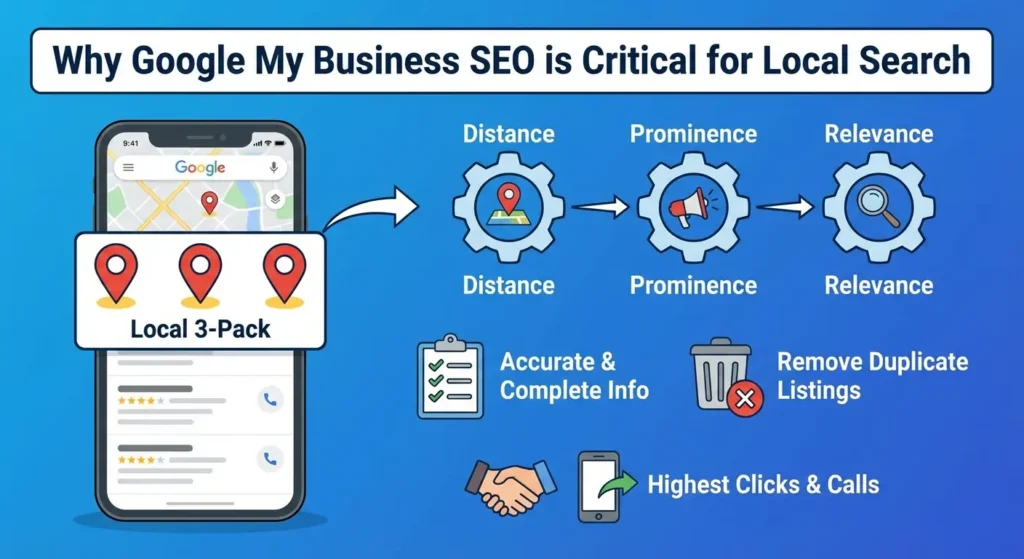
When users search for services or products near them, Google shows a map with three business listings below it. This is the local 3-pack. Appearing in this specific section generates the highest amount of clicks and phone calls for local businesses.
Google decides which three businesses to show based on three main factors: distance, prominence, and relevance.
Distance is how close the user is to your business address. You cannot change your physical location, but you can improve your prominence and relevance through active management.
Prominence refers to how well-known your business is based on links, articles, and reviews across the web. Relevance refers to how well your listing matches the specific words the user typed into the search bar.
According to Google’s official guidelines on local ranking, providing complete and accurate information is the best way to match with user searches. Before you start adding new information to improve your relevance, you need to make sure you do not have conflicting data online.
Having multiple listings for the exact same business location confuses the search system and lowers your ranking. If you find duplicate listings for your business, you need to remove them immediately.
You can follow our instructions on how to delete a Google Business Profile to clean up your online presence before you start your main optimization work.
Core Optimization Requirements
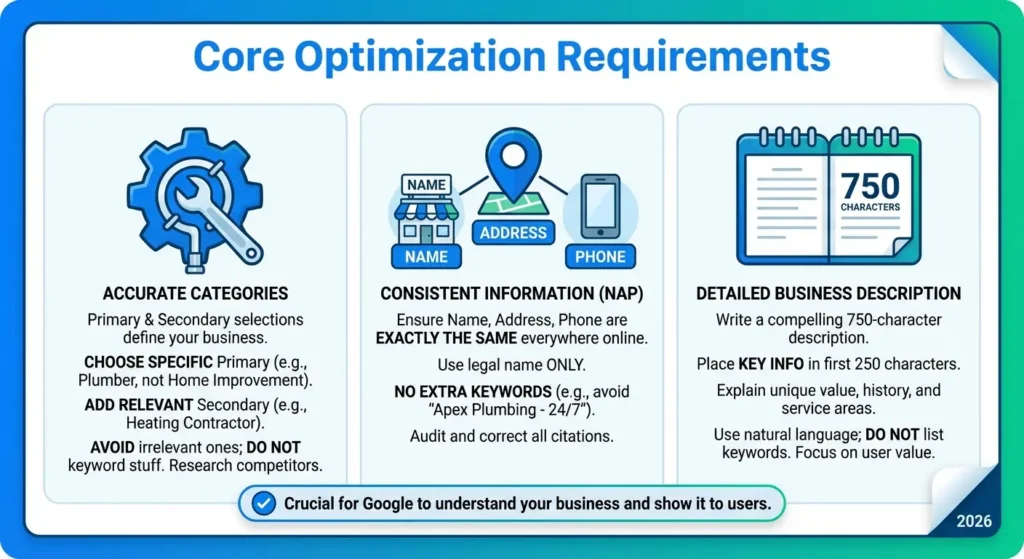
The most important part of gmb seo is making sure the primary data points on your listing are accurate.
Google uses this information to understand exactly what your business does and where you operate. If this data is missing or incorrect, the search system will not show your profile to users.
Selecting Primary and Secondary Categories
Your business category is the single strongest ranking factor for your profile. It tells the search system exactly what your business is.
You are required to pick one primary category. You must choose the most specific category available that describes your main business operation. For example, if you fix pipes, choose Plumber instead of the broader category Home Improvement.
You can also add up to nine secondary categories. You should use these to list other specific services you offer. If your primary category is Plumber, your secondary categories could be Heating Contractor or Drainage Service.
Do not add secondary categories that do not apply to your business just to get more views. The search system penalizes profiles that use inaccurate categories.
Review the categories your top-ranking competitors use and apply the relevant ones to your own profile. You can read more about broad category strategies in our guide to Google Business Profile optimization.
Ensuring Consistent Business Information
Your business name, address, and phone number must be exactly the same across the entire internet. This is known as NAP consistency
Google checks other websites, directories, and social media platforms to verify the information on your profile. If your profile says your address is 100 Main Street, but your Yelp profile says 100 Main St., the search system views this as an inconsistency.
Always use your exact legal business name. Do not add extra keywords to your business name on Google. If your business is named Apex Plumbing, do not enter Apex Plumbing – 24/7 Emergency Plumber Seattle.
Adding extra words violates the terms of service and can result in your profile being suspended. You must audit all your local citations and directories to ensure the name, address, phone number, and website link match your Google profile exactly.
Writing a Detailed Business Description
Google gives you 750 characters to write a description of your business. This section does not directly impact your search rankings, but it is highly visible to users and impacts whether they decide to contact you.
Use this space to explain what makes your business different, how long you have been operating, and the specific areas you serve.
Put the most important information in the first 250 characters because that is the portion that displays before the user has to click a button to read more.
Write in complete sentences and naturally include some of the terms your customers use when searching for your services. Do not list keywords in a row. The description must read normally and provide actual value to the person reading it.
Advanced Content Strategies
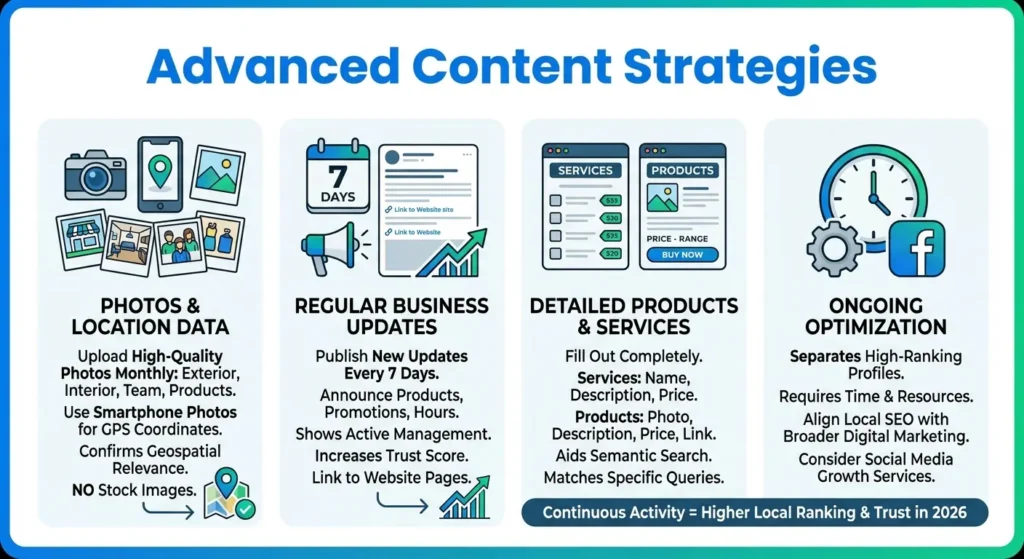
After completing the core setup, you have to use the additional features within the dashboard to provide more context to the search system.
This ongoing work is what separates standard listings from highly ranked profiles. Regular activity proves to Google that your business listing optimization is current and your business is operating actively.
Uploading Photos and Utilizing Location Data
Profiles with high-quality photos receive more requests for directions and more website clicks than profiles without photos.
You need to upload photos of your building exterior, the interior of your office or store, your team members working, and the products you sell. You should upload new photos at least once every month.
Looking For Google Reviews? Claim your Discount Below
 8,492 people used this service in the past 7 days

When you take photos with a smartphone, the image file stores the GPS coordinates of where the photo was taken. Uploading photos taken at your business location or at a job site provides geospatial relevance to the search system.
It confirms you are doing business in the areas you claim to serve. Always use actual photos of your business. Do not use stock images. The search system can detect stock imagery and it will not help your local search ranking.
Publishing Regular Business Updates
The updates feature allows you to post text, photos, and links directly to your profile. These updates show up at the bottom of your listing in the search results. You should use this feature to announce new products, explain current promotions, or share updates about your operating hours.
You need to publish a new update every seven days because standard posts expire and disappear from the main view after a week. Regular posts tell the search system that the business owner is actively managing the information.
This increases the trust score of your entity. You can link these updates back to specific pages on your website to drive direct traffic.
Detailing Your Products and Services
The dashboard includes specific sections to list your products and services. You need to fill these out completely.
For the services section, add the name of the service, a detailed description, and the price if applicable.
For products, you can add a photo, a description, a price range, and a button that links directly to the checkout page on your website.
Filling out these menus helps with semantic search. When a user searches for a very specific item, the search system checks your product and service menus to see if you offer it. If you have detailed descriptions, you are much more likely to show up for those specific queries.
Growing your local presence takes time and resources, and it often helps to align your local SEO with broader digital marketing efforts. If you need help expanding your overall brand awareness online, you can review our social media growth services to support your local efforts.
The Impact of Customer Reviews
Customer reviews are one of the most significant factors for your google my business seo. Google uses the total number of reviews, the average star rating, and the frequency of new reviews to decide how high to rank your profile.
Generating a High Volume of Reviews
You need a strategy to get new reviews every single week. A profile with 100 reviews from three years ago will often rank lower than a profile with 30 reviews from the past two months.
This is called review velocity. You have to ask every customer to leave a review after you complete a service or sell a product. You can send an email or a text message with a direct link to your review page.
It is very difficult to rank in the top three map positions if your competitors have hundreds of positive reviews and you have none. If you are struggling to get initial traction or if you need to establish social proof quickly to compete in your local market, you can buy Google reviews directly from our system.
This provides the initial trust signals required to increase your conversion rate, which then leads to more natural customer reviews over time.
Managing and Responding to Feedback
You are required to respond to every single review you receive, whether it is positive or negative. Responding shows the search system that you are an active and responsible business owner. It also shows potential customers that you care about their experience.
When you respond to a positive review, thank the customer by name and mention the specific service you provided. For example, instead of just saying thank you, write a response stating you are glad they were happy with the pipe repair service at their home. This naturally adds related terms into the review section.
When you get a negative review, respond professionally. Apologize for the specific issue they mentioned and provide a phone number or email address for them to contact you to resolve the problem offline.
Utilizing the Questions and Answers Feature
The Q&A section allows anyone on the internet to ask a question about your business, and anyone can answer it. You do not have to wait for customers to ask questions.
You should proactively write out the most common questions your customers ask and then answer them yourself. Create a list of five to ten common questions about your parking situation, your pricing, your service area, and your return policy.
Post the questions to your profile and answer them accurately. This creates a localized FAQ section directly on the search results page, which improves your relevance score for specific user queries.
Frequently Asked Questions
Can I do my own Google SEO for my business profile?
Yes, you can manage your own optimization. It does not require coding knowledge.
You have to claim your listing, make sure your business name, address, and phone number are completely accurate, choose the most specific primary category, and actively gather and reply to customer reviews every week. It requires consistent weekly effort rather than technical skills.
How long does it take to see results from Google My Business SEO?
Changes to your local search ranking usually take between two and four weeks to show up after you update your profile.
If you operate in a city with heavy competition and many similar businesses, it will take several months of posting weekly updates and generating consistent reviews before you see your profile move into the top three map positions.
Does my Google Business Profile impact my website’s organic ranking?
Yes, your profile and your website are connected. A fully optimized profile sends highly targeted local visitors directly to your website.
The trust you build through an accurate profile and a high volume of positive reviews tells the search system that your business is a legitimate entity, which helps your main website rank higher in the standard text search results.
How often should I update my Google Business Profile?
new text or photo update every seven days. You are required to respond to new customer reviews within 24 to 48 hours of receiving them.
You also need to upload fresh, high-quality photos of your business operations or products at least once a month to show the search system your profile is active.
