How to Delete Google Business Profile (GBP) in 2026
How to delete Google Business Profile is one of the most common searches for business owners who are closing up shop, moving, or dealing with a duplicate listing. If you are frustrated because you cannot find a simple “delete” button, you are not alone.
Google prioritizes historical data, which means they prefer to mark businesses as “Permanently Closed” rather than wiping them off the map entirely.
However, removing a profile is possible if you follow the right steps.
In this guide, we will walk you through the exact process to remove your business profile on Google using the 2026 interface.
We will also cover the critical difference between “closing” and “removing” a profile, and what to do if you are deleting your account just to get away from bad reviews.
Table of Contents
Important: Read This Before You Delete
Before you rush to the settings menu, you need to understand what “deletion” actually does. Google’s system is designed to be a directory of the real world, including places that used to exist.
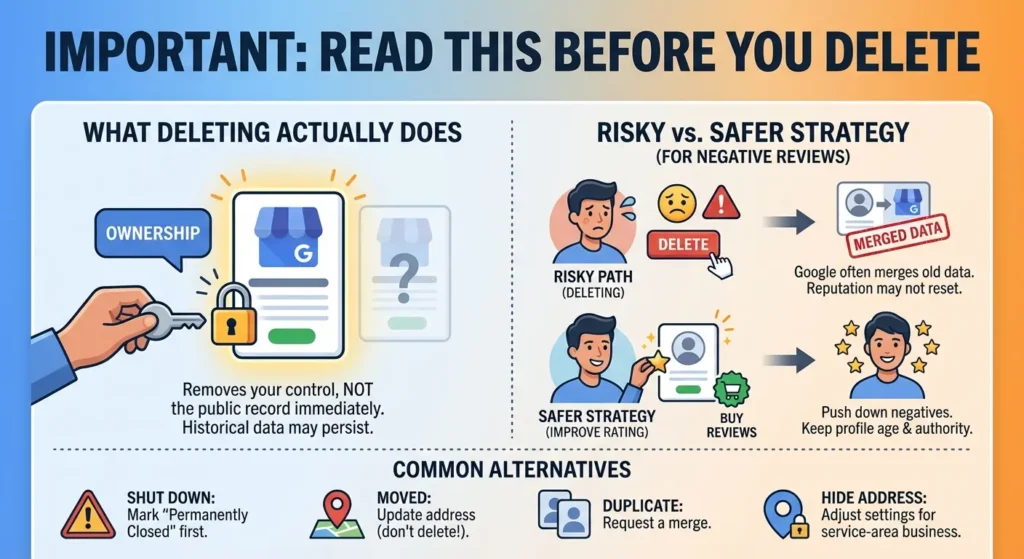
When you select the option to delete your profile, you are essentially removing your ownership and control of the listing. You are not necessarily deleting the public record of the business immediately.
If you are deleting your profile because of negative feedback, pause for a moment. Deleting a profile to reset your reputation is risky because Google often merges old data with new profiles if the address or phone number matches.
A safer strategy is often to buy Google reviews to push down the negatives and improve your overall rating. This allows you to keep your profile age and authority while fixing the reputation score.
Common Reasons to Delete vs. Alternatives
- The business is permanently shut down: You should mark it as “Permanently Closed” first, then remove the profile content.
- You moved to a new address: Do not delete. Update your address instead. Deleting will destroy your SEO ranking.
- You have a duplicate listing: You should request a merge, not a deletion.
- You just want to hide your address: If you run a service-area business (like a plumber or consultant) from home, you can hide your address in the settings without deleting the profile.
How to Delete Business Profile on Google: Step-by-Step Guide
In 2026, the old Google My Business dashboard is gone. You now manage everything directly through Google Search or Google Maps. This interface is often called the “New Merchant Experience” (NMX).
Follow these steps to remove your profile:
Step 1: Access Your Profile Settings
First, ensure you are logged into the Google account used to manage the business. Go to Google Search and type “My Business” or your exact business name. You should see your management dashboard appear at the top of the search results.
- Look for the three vertical dots (the menu icon) usually located near the top right of your business panel.
- Click the dots and select Business Profile settings.
Step 2: Navigate to the Removal Tool
Inside the settings menu, you will see several options like “People and Access” or “Advanced Settings.”
- Select Remove Business Profile.
- You will likely see two options here. Choose Remove Profile Content and Managers.
Step 3: Confirm the Removal
This is the most critical step. Google will present you with a final warning. They will explain that:
- Your posts, photos, and videos will be deleted.
- You will lose access to respond to reviews.
- Google Ads campaigns connected to this profile will stop.
If you are sure, click Continue and then Remove.
Note: If you are trying to remove a profile because it was suspended and you can’t get it back, the standard deletion method might fail. You should check our guide on the Google Business Profile suspended fix before giving up.
For a detailed breakdown of what specific content is lost during this process, you can refer to Google’s official guide on removing a business profile.
The “Ghost” Listing: Why Is It Still There?
One of the most confusing parts of this process is checking Google Maps a week later and seeing your business is still there.
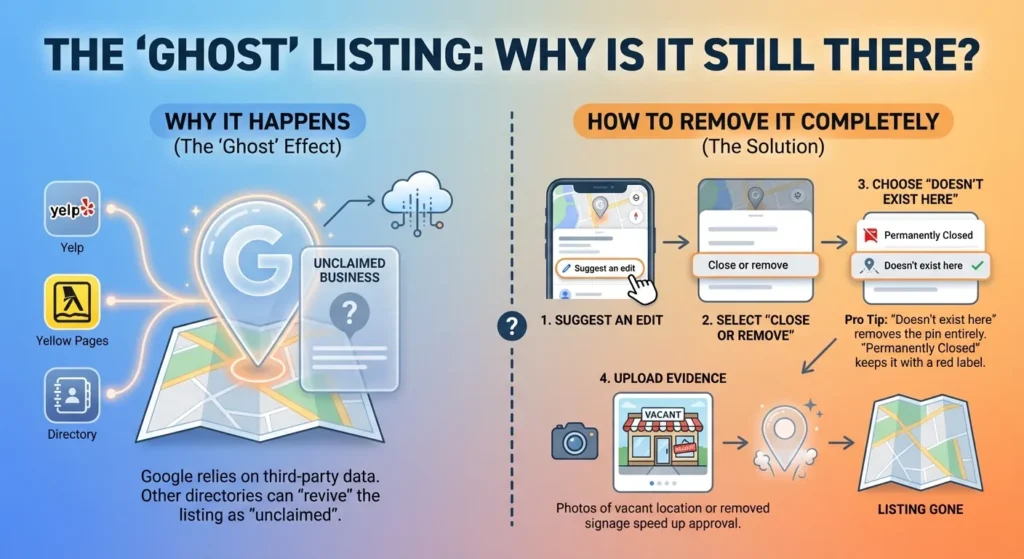
When you follow the steps above, you remove the account, but the location might remain on Maps as “unclaimed.”
Looking For Google Reviews? Claim your Discount Below
 8,492 people used this service in the past 7 days

This happens because Google relies on third-party data sources. If Yelp, Yellow Pages, or other directories still list your business, Google might “revive” the listing because its algorithm believes the business still exists.
How to Remove Google Business Profile from Maps Completely
If the listing persists after you have deleted it from your dashboard, you need to suggest an edit as a member of the public.
- Open Google Maps and find the business location.
- Click on Suggest an edit.
- Select Close or remove.
- Choose the reason “Doesn’t exist here“.
- Pro Tip: This is more effective than “Permanently Closed” if you want the pin removed entirely. “Permanently Closed” keeps the pin on the map with a red label. “Doesn’t exist here” tells Google the location is invalid.
- If you have photos proving the signage is gone or the building is vacant, upload them. Evidence speeds up the approval process.
Should You Delete or Just “Rebrand”?
Many business owners want to delete their Google business account because they are pivoting their services. For example, a “Wedding Photographer” becomes a “Corporate Headshot Photographer.”
In this case, do not delete. You have spent years building trust with Google. Instead, update your categories and business name. If you are worried about old reviews that don’t match your new direction, you can work on generating new, relevant feedback.
You can read more about how to get more Google reviews to drown out the irrelevant ones. Keeping the profile alive preserves your ranking power, which is much harder to build from scratch.
However, if you are determined to start fresh, ensure you have a plan for your new online presence. A new Google profile will have zero authority.
You will need to aggressively build social proof. We recommend pairing your new profile launch with a strategy for social media growth to signal to Google that your new brand is active and legitimate.
Conclusion
If you have successfully deleted your old profile and are launching a new venture, you are starting at zero. Google’s algorithm trusts age and activity. A brand new profile is often invisible for the first few months.
To speed up this process, focus on three things:
- Verification: Get verified immediately via video or postcard.
- Activity: Upload photos and add products.
- Reviews: This is the most significant trust signal. Since you don’t have past customers for the new brand yet, using a service to buy Google reviews can provide the initial momentum needed to get the profile ranking in local search.
Remember, the goal of Google Maps is to provide accurate information to users. Whether you are deleting a profile or building a new one, ensure your actions align with what is actually happening in the real world.
If you try to trick the system by deleting a profile just to clear a bad history without changing the business name or location, Google will likely catch on and reinstate the old data.
Always aim for transparency. If the business is gone, mark it closed. If it’s a new chapter, build a new profile and focus on gathering 5-star feedback from day one.
Frequently Asked Questions
Can you permanently delete a Google business page?
Yes, you can permanently delete the management account and the content you uploaded (like posts and owner photos). However, you cannot always force Google to delete the “Place” from Maps immediately.
If the business was popular or has many citations across the web, Google may keep a “Permanently Closed” record for users’ reference. This eventually fades over time as user engagement drops to zero.
Can I have my business removed from Google?
You can remove your business if it meets specific criteria. If the business never existed, is a duplicate, or is a private home address that shouldn’t be public,
Google is likely to grant a total removal. If it is a legitimate business that has simply closed, Google prefers to mark it as closed rather than removed. If you are seeing reviews vanish or fluctuate during this process, read about why Google reviews disappear.
How long does it take to delete a Google Business Profile?
The removal of your access and your content is instant. Once you click “Remove,” your dashboard access is gone. However, the update to the public search results can take anywhere from 24 hours to 30 days.
Search engines need time to “decache” the information. If you used the “Suggest an Edit” method to report the business as non-existent, approval can take a few days depending on the strength of your evidence.
Why can’t I delete my Google Business Profile?
There are usually three reasons why the delete button isn’t working or isn’t available:
- You are not the Primary Owner: Only the primary owner can delete the profile. If you are a “Manager,” you can only remove yourself from the listing.
- The listing is verified by a third party: Some large chains or hotel listings are managed via bulk feeds or third-party partners, restricting manual deletion.
- The profile is suspended: If Google has locked the profile, they often restrict your ability to make changes until you resolve the suspension.