Google Business Profile Suspended? Fix it Quick 2026
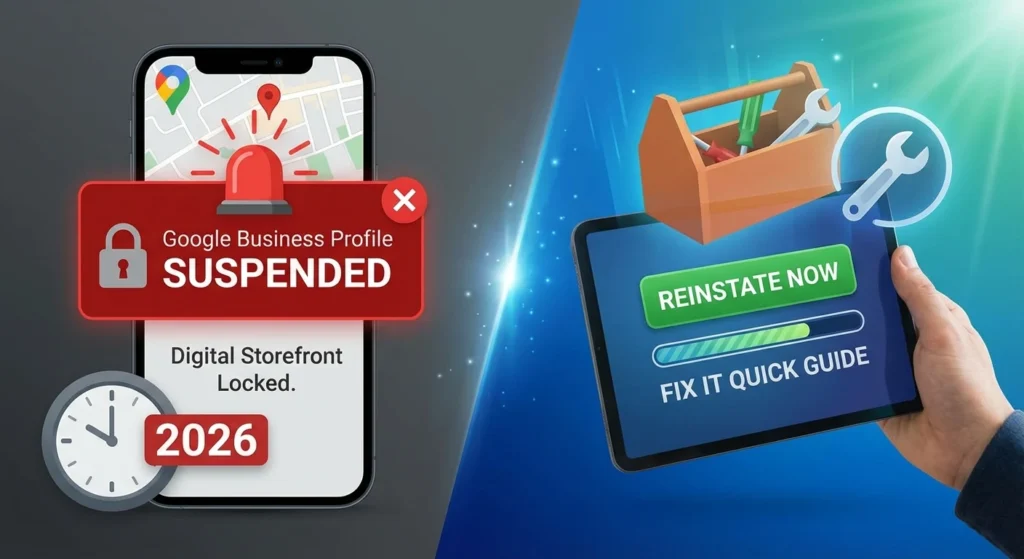
Finding that your google business profile suspended can feel like your digital storefront just had the locks changed overnight. One day you are ranking for local searches, and the next, your phone stops ringing because your listing has vanished from Google Maps.
In 2026, Google’s automated systems are more aggressive than ever, but getting back online is a straightforward process if you follow the right steps.
This guide will walk you through exactly why this happened and how to fix it fast so you can get back to growing your business.
Table of Contents
What Does a Google Business Profile Suspension Actually Mean?
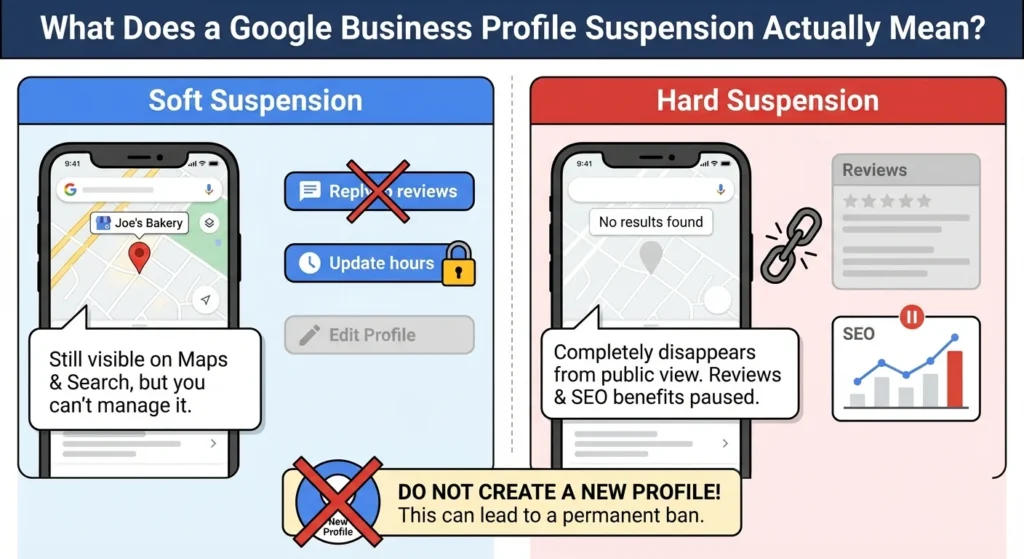
A suspension happens when Google decides your listing no longer meets their “Business Profile Quality” standards. There are two main types you might encounter:
- Soft Suspension: Your business listing still appears on Google Maps and Search, but you have lost the ability to manage it. You cannot reply to reviews or update your hours.
- Hard Suspension: This is the most serious. Your business completely disappears from the public eye. Any SEO benefits from Google reviews you’ve built up are effectively paused until the profile is restored.
When this happens, your first instinct might be to create a new profile. Do not do this. Creating a duplicate listing while one is suspended is a major red flag that can lead to a permanent ban of your entire Google account.
Why Did My Google Business Listing Get Suspended?
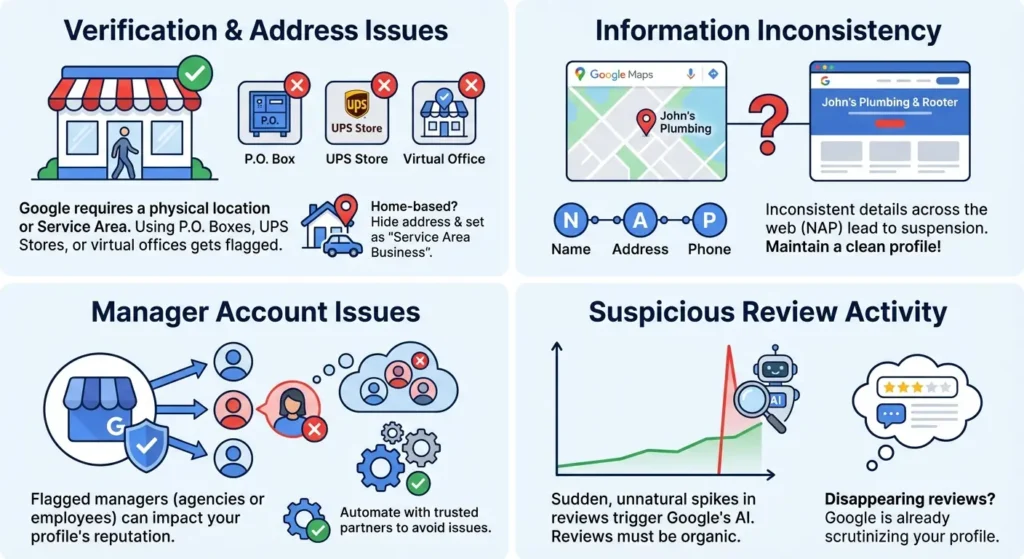
Google rarely gives you a specific reason for the suspension. Instead, you usually get a vague email citing “policy violations.” However, based on current trends, here are the most likely culprits:
1. Verification and Address Issues
Google requires a physical location where customers can visit you, or a specific service area. Using a P.O. Box, a UPS Store address, or a virtual office is a guaranteed way to get flagged. If you work from home, you must hide your address and set yourself as a “Service Area Business.”
2. Information Inconsistency
If your business name on Google is “John’s Plumbing” but your website and official documents say “John’s Plumbing & Rooter,” Google may suspend you for a lack of consistency. This is where having a clean NAP (Name, Address, Phone) profile across the web becomes critical.
3. Manager Account Issues
Sometimes the problem isn’t your business, but the person managing it. If you have a marketing agency or an employee with access to your profile who has been flagged on other accounts, their “reputation” can bleed over into yours.
It is vital to automate your Google reviews and management through trusted partners to avoid these pitfalls.
4. Suspicious Review Activity
If Google’s AI detects a sudden, unnatural spike in reviews, it may trigger a manual review of your account. While reviews are the lifeblood of local search, they must look organic.
If you find your Google reviews disappearing, it’s often a sign that Google is already scrutinizing your profile.
How to Fix a Suspended Google Business Profile in 2026
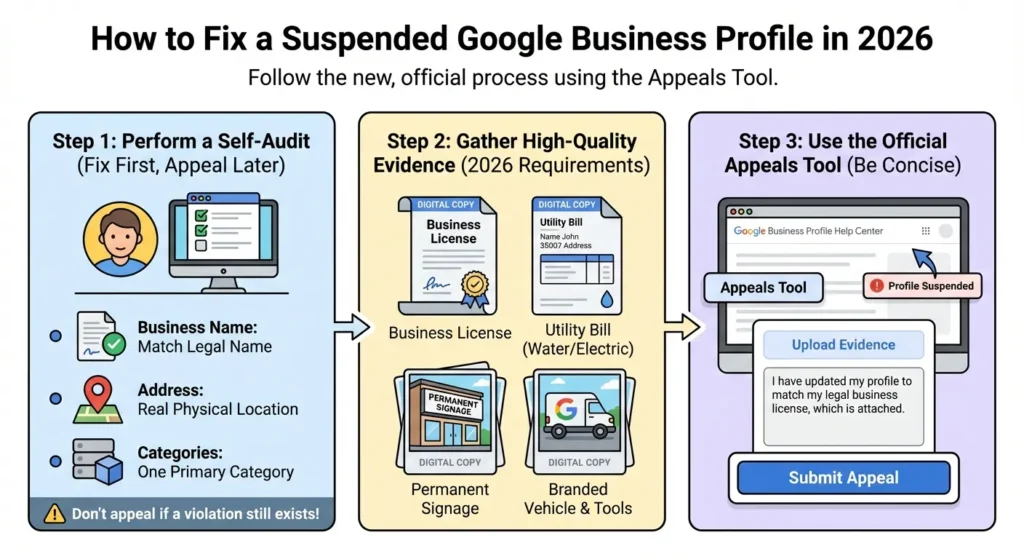
The recovery process has changed over the last year. You no longer just “email support.” You must use the official Google Business Profile Appeals Tool.
Step 1: Perform a Self-Audit
Before you even think about clicking “Appeal,” you must fix the problem. If you appeal while your listing still violates a rule, Google will reject you, and second appeals are much harder to win.
- Check your business name. Does it match your legal business name?
- Check your address. Is it a real physical location?
- Check your categories. Are you using too many? Stick to one primary category that defines your business.
Step 2: Gather Your Evidence
In 2026, Google requires high-quality proof. You should have digital copies of:
Looking For Google Reviews? Claim your Discount Below
 8,492 people used this service in the past 7 days

- Your official business license.
- A utility bill (Water, Electric, or Internet) showing the business name and address.
- A photo of your permanent signage outside your building.
- For service-area businesses, a photo of your branded vehicle and tools.
Step 3: Use the Appeals Tool
Navigate to the official Google Business Profile Help Center. The tool will show you which profiles are suspended. Select the correct one and upload your evidence.
Be concise. Tell them: “I have updated my profile to match my legal business license, which is attached.”
How Long Does Reinstatement Take?
Once you submit your appeal, expect to wait between 3 and 7 business days for an initial response.
During “spam sweeps,” this can stretch to 14 days. Resist the urge to submit multiple appeals, as this creates a new ticket and pushes you to the back of the line.
While you wait, your rankings will likely drop. This is why many businesses choose to buy Google reviews once they are back online to quickly signal to the algorithm that the business is active and trusted by the community again.
Conclusion
A suspension is a wake-up call that your digital presence is fragile. Relying on just one platform is risky. While you fix your GBP, focus on your social media growth to ensure customers can still find you elsewhere.
Once your profile is live again, you need to “prime the pump.” Google’s algorithm looks for fresh activity to regain confidence in your listing.
Using a service like reputationmanage.co to safely buy Google reviews can help you recover your lost rankings by showing Google that customers are still engaging with your brand.
Final Checklist for 2026
- Never use a virtual office address.
- Always keep your business name identical to your legal documents.
- Keep a folder of your business license and utility bills ready for yearly verification checks.
Getting suspended isn’t the end of your business, but how you handle the next 48 hours determines how much money you’ll lose in the long run.
Fix the errors, submit your proof, and once you’re back, hit the ground running with a fresh batch of 5-star reviews.
Frequently Asked Questions
Why did my Google business listing get suspended?
Most listings are suspended due to address issues (using a virtual office) or name stuffing (adding keywords like “Best NYC Plumber” to your business name). Google’s AI also triggers “sweeps” that can catch legitimate businesses by mistake if their online data is inconsistent.
How long does it take for Google to reinstate a suspended account?
While Google says 3 days, the realistic 2026 timeline is 5 to 10 business days. If you provide clear evidence like a business license and a photo of your storefront sign in the first appeal, the process is much faster.
What does it mean when a business is suspended?
A suspension means you have lost control over your Google representation. You cannot reply to the positive reviews you’ve earned or update your information. In a “hard suspension,” your business is completely removed from Google Search and Maps.
What happens if Google suspended my account?
If your personal Google account is suspended, you lose access to all managed profiles. If just the business is suspended, your SEO rankings will plummet over time because your “place ID” is no longer active. You must resolve this quickly to avoid long-term damage to your local authority.