Best Ways to Automate Google Reviews in 2026

Managing a business in 2026 is faster and more demanding than ever. The old days of manually emailing customers one by one to ask for a review are gone. If you are still doing that, you are losing valuable time and, more importantly, valuable feedback.
Today, automated google reviews are the standard. They ensure you never miss a chance to gather social proof, even while you sleep. But automation isn’t just about speed; it’s about consistency.
A steady stream of fresh 5-star ratings signals to Google that your business is active, trusted, and ready for new customers.
In this guide, we will break down exactly how to set up a system that works on autopilot, keeping your reputation spotless without the manual headache.
If you are looking for the big picture on reputation strategies, check out our parent article: Google Review Management: The Complete Guide for Your Brand (2026).
Table of Contents
What is Google Review Automation?
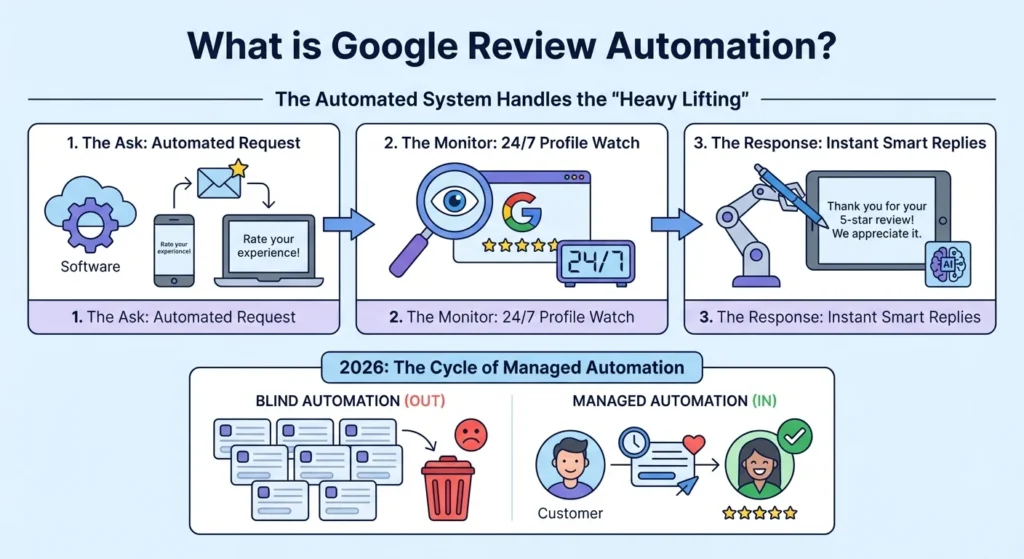
At its core, Google review automation is the use of software to handle the “heavy lifting” of reputation management.
Instead of a human staff member remembering to ask a customer for feedback, a system does it for you immediately after a purchase or service is completed.
A fully automated system handles three main tasks:
- The Ask: Sending a request (via email or SMS) to the customer.
- The Monitor: Watching your profile 24/7 for new ratings.
- The Response: Using smart tools to draft or post replies instantly.
In 2026, the difference between a growing brand and a stagnant one is often how well they manage this cycle. “Blind automation” (spamming everyone) is out; “Managed automation” (smart, timed, and personalized requests) is in.
Why Automation is Essential for 2026 Local SEO
You might wonder, “Can’t I just ask people when they visit?” You can, but human error is real. You will forget. Your staff will forget. Automation doesn’t forget.
1. Velocity and Consistency
Google loves “freshness.” A business with 50 reviews from three years ago ranks lower than a business with 20 reviews from the last three months.
Automation ensures a consistent “drip” of new feedback, which is a major ranking factor for Local SEO.
2. The 24-Hour Expectation
Customers today expect speed. Studies show that over 50% of consumers expect a response to their review within 24 hours.
Achieving this manually is nearly impossible for busy teams. Automated alerts and drafting tools make hitting this deadline easy.
3. Operational Efficiency
Your team should be focused on selling and serving, not staring at a dashboard. By automating the review process, you free up hours of labor every week.
3 Key Pillars of an Automated Google Review Strategy
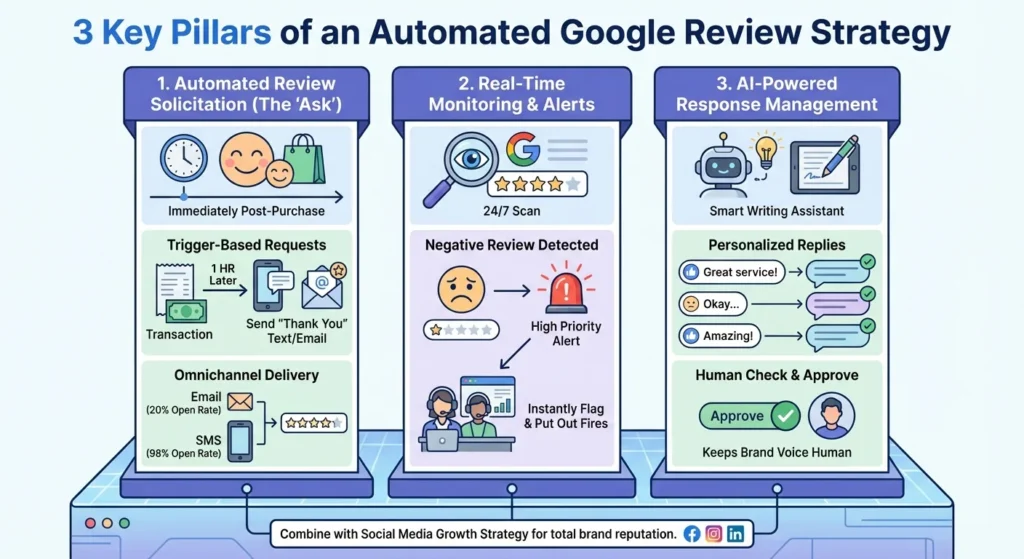
To successfully automate google reviews, you need to build your strategy on three pillars.
1. Automated Review Solicitation (The “Ask”)
This is the most critical step. The best time to ask for a review is right when the customer is happiest, usually immediately after a purchase or a completed service.
- Trigger-Based Requests: Set your system to send a “Thank You” text or email exactly 1 hour after a transaction.
- Omnichannel Delivery: Don’t rely on just email. SMS requests often have a 98% open rate compared to email’s 20%.
2. Real-Time Monitoring & Alerts
You cannot fix a problem you don’t know about. Automated monitoring tools scan your Google Business Profile constantly.
If a negative review comes in, the system instantly flags it and sends a “High Priority” alert to your support team. This allows you to put out fires before they spread.
3. AI-Powered Response Management
Writing unique responses to hundreds of “Great service!” reviews is tedious. In 2026, smart writing assistants can draft personalized replies for you.
You simply check them and hit “Approve.” This keeps your brand voice human without the manual typing.
For businesses looking to expand their presence beyond just Google, combining this with a strategy for social media growth ensures your reputation is solid across all platforms.
How to Automate Google Reviews in 6 Steps
Ready to set this up? Here is the step-by-step process.
Step 1: Audit Your Google Business Profile
Before automating, ensure your house is in order. Make sure your business name, address, and hours are correct.
Looking For Google Reviews? Claim your Discount Below
 8,492 people used this service in the past 7 days

You also need your specific “Place ID” from Google, which allows software to send customers directly to your review form.
Step 2: Select Your Automation Stack
You don’t need to be a coder. You can use “All-in-One” reputation platforms that handle everything, or build a custom workflow using connectors like Zapier or Make.
- All-in-One: Easier to set up, but more expensive.
- Custom Workflow: Cheaper and more flexible (e.g., connecting your Google Sheets to your email sender).
Step 3: Define Your Triggers
When should the request go out?
- E-commerce: 3-5 days after shipping (to ensure they received the item).
- Service Business: 1 hour after the appointment ends.
- Restaurants: 30 minutes after the check is paid.
Step 4: Craft Smart Response Templates
Don’t sound like a robot. Create “templates” that your automation tool can rotate through.
- Template A: “Thanks for the kind words, [Name]! We’re glad you loved the [Service].”
- Template B: “We appreciate your feedback, [Name]. Hope to see you again soon!”
Step 5: Review & Refine
Even automated systems need a check-up. Once a month, look at your conversion rates. Are people opening your emails but not leaving reviews? You might need to change your subject line.
Step 6: Display Your Wins
Once the reviews start rolling in, don’t hide them. Show them off! You should learn how to add google reviews to your website to build trust with visitors immediately.
Advantages & Drawbacks of Automation
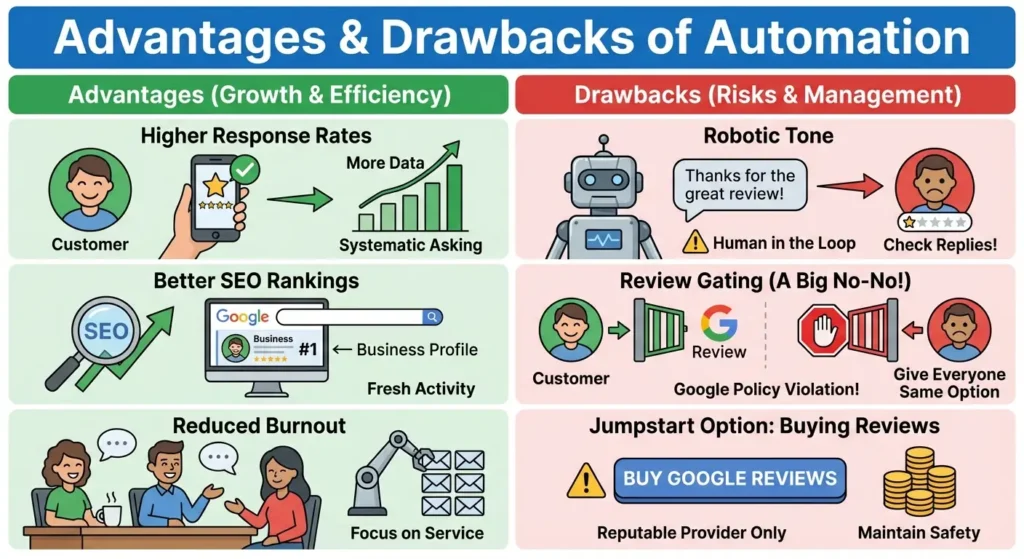
Automation offers a clear path to growth, starting with Higher Response Rates. When you ask every single customer for feedback systematically, you naturally gather more data than you would by only asking “when you remember.”
This consistency leads directly to Better SEO Rankings, as search engines prioritize businesses with steady, fresh activity over those with stagnant profiles.
Furthermore, automation solves the operational headache of Reduced Burnout; your team no longer needs to waste hours copy-pasting the same email 50 times a day, allowing them to focus on actual customer service.
However, there are risks to manage. The biggest danger is sounding like a machine, or what we call a Robotic Tone.
If you automate replies completely without checking them, you might accidentally reply “Thanks for the great review!” to a serious 1-star complaint. To avoid this embarrassment, you should always keep a human in the loop for negative reviews.
Another critical error to avoid is Review Gating. This is a big no-no where businesses ask customers “Did you like us?” and only send the happy ones to Google. Google’s User Contributed Content Policy strictly forbids this; you must give everyone the same option to review.
Sometimes, a business needs an immediate boost while waiting for these automated systems to kick in. In specific cases, some brands choose to buy google reviews to jumpstart their profile. If you choose this route, ensure you are using a reputable provider to maintain safety and compliance.
Top Tools for Google Review Automation in 2026
There is no shortage of tools, but here is what the landscape looks like right now:
- ReputationManage.co: The best all-in-one choice for 2026. It combines smart automation with strategic human oversight, ensuring you get the maximum number of reviews without risking your brand’s voice. Perfect for businesses that want results on autopilot.
- Podium: The heavy hitter for SMS automation. Great for local service businesses that rely strictly on text message communication.
- Birdeye: Excellent for large enterprises needing deep reporting and complex multi-location analytics.
Conclusion
Automation is the engine, but your service is the fuel. No amount of automated google reviews software can save a business that treats customers poorly.
However, for a business that does great work, automation is the megaphone that tells the world about it.
By setting up these triggers and monitoring systems, you ensure that your digital reputation grows in the background, letting you focus on what you do best: running your business.
Frequently Asked Questions
How to get Google reviews automatically for free?
You can create a basic semi-automated system for free. First, find your Google Review link in your Business Profile. Then, create an email signature template that includes this link.
Every time you email a client, the “Ask” is there. For a step up, use a free email marketing tool (like the free tier of Mailchimp) to send a “Thank You” email automatically when a new subscriber joins your list.
Can you use AI for Google reviews?
Yes, absolutely. In 2026, AI is primarily used to draft responses. It reads the customer’s review, understands the sentiment, and writes a polite reply for you to approve.
However, it is not recommended to use AI to write fake reviews for yourself. Google’s algorithms are incredibly smart at detecting AI-generated patterns and will suspend accounts caught doing this.
Is a Google review link generator free?
Yes. Google provides your review link for free directly in your dashboard. You do not need to pay a third-party service just to get the link. Look for the “Ask for reviews” button in your Google Business Profile manager.
Is 4.7 a good Google rating?
Believe it or not, a 4.7 is often better than a 5.0. Consumers are smart. When they see a business with 500 reviews and a perfect 5.0 rating, they get suspicious.
It looks fake. A 4.7 or 4.8 shows that you are excellent, but also real, you have handled a few unhappy customers gracefully. This authenticity builds more trust than perfection.