How to Embed Google Reviews on Website EASY in 2026

Embed google reviews on website pages is one of the fastest ways to turn a skeptical visitor into a confident customer.
When someone lands on your site, they aren’t just looking at your prices or your design; they are looking for a reason to trust you. Seeing a live feed of happy customers providing honest feedback is that reason.
In this guide, we will skip the overly technical headaches and show you exactly how to get your Google reviews visible on any platform. Whether you use WordPress, Shopify, or a custom HTML site, you can have this running in minutes.
Table of Contents
Why You Must Embed Google Reviews on Your Website
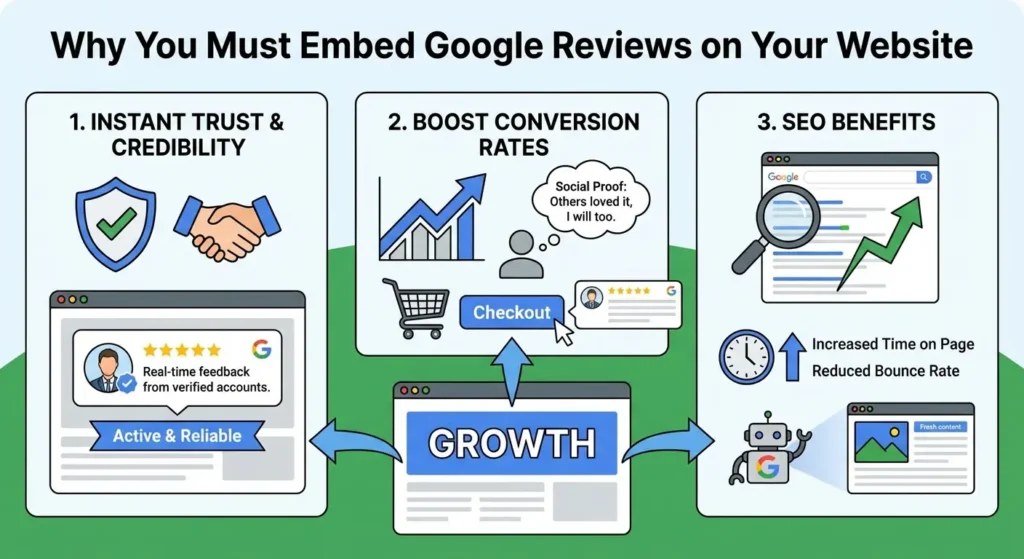
It is easy to think of reviews as just “vanity metrics,” but they are functional assets for your website.
When you embed google reviews, you are not just showing off; you are actively improving the performance of your web pages.
1. Instant Trust and Credibility
Trust is the currency of the internet. A clean, professional website is great, but it doesn’t prove that you deliver on your promises.
Real-time feedback from verified Google accounts does. When a visitor sees a widget updating with recent positive feedback, it signals that your business is active and reliable.
If you are struggling to get enough reviews to make your widget look impressive, you might consider a strategy to buy Google reviews from Reputation Manage.
This helps kickstart your social proof so your embedded widget isn’t displaying empty space or outdated feedback.
2. Boost Conversion Rates
There is a psychological concept called “Social Proof.” It essentially means that people copy the actions of others. If they see that 50 other people bought your service and loved it, they are significantly more likely to do the same.
Placing a review widget near your “Checkout” or “Contact Us” button can be the deciding factor for a hesitant buyer.
3. SEO Benefits
Google loves fresh content. If you have a static HTML website that you rarely update, Google’s crawlers might visit less frequently.
However, a review widget technically injects new text onto your page every time you receive a new review. This signals to search engines that your site is alive.
Furthermore, users tend to stop and read reviews. This increases the “Time on Page” and reduces “Bounce Rate,” which are positive signals for your SEO rankings.
For more on how this impacts your search visibility, read our guide on the benefits of Google reviews for SEO and sales.
3 Methods to Embed Google Reviews (Free vs. Paid)
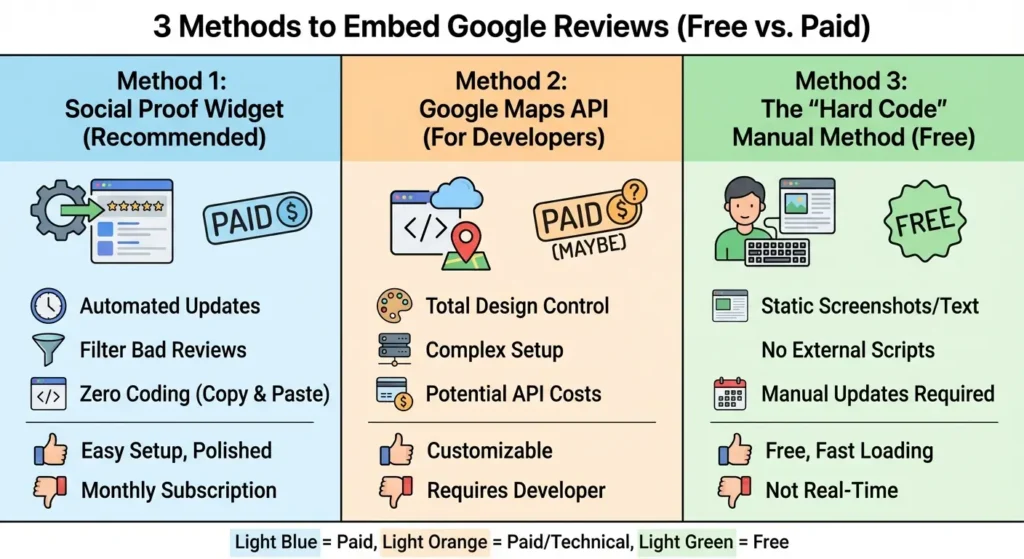
There isn’t just one way to get google reviews on website pages. Depending on your budget and technical skills, you can choose from three main paths.
Method 1: Use a Social Proof Widget (Recommended)
This is the standard for 99% of businesses in 2026. You use a third-party tool (like Elfsight, EmbedSocial, or others) that connects to your Google account.
- Pros: It’s automated. New reviews appear instantly. You can filter out bad reviews.
- Cons: Most good widgets require a small monthly subscription.
This method is ideal because it requires zero coding knowledge. You just copy a script and paste it.
If you are also managing reputation across other platforms, you can look into our services for social media growth to ensure your Facebook and Instagram presence matches your Google reputation.
Method 2: The Google Maps API (For Developers)
If you have a developer on your team, you can pull review data directly using the Google Places API.
- Pros: You have total control over the design.
- Cons: It is complex to set up. You need a Google Cloud billing account, and if your site gets massive traffic, Google might charge you for API calls.
Method 3: The “Hard Code” Manual Method (Free)
This involves taking screenshots of your best reviews or copying the text and pasting it into your website manually.
- Pros: It is free and doesn’t slow down your site with external scripts.
- Cons: It is static. If you get a new glowing 5-star review tomorrow, it won’t show up on your site until you manually add it.
Step-by-Step: How to Generate Your Google Reviews Embed Code
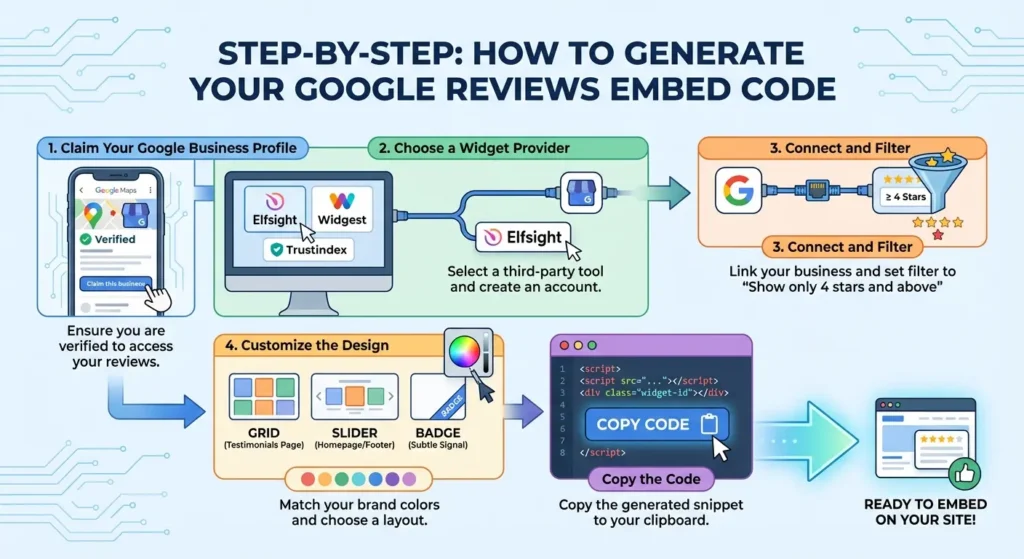
If you choose the widget route (Method 1), the process is generally the same regardless of which tool you use. Here is the workflow to get your google reviews embed code.
Step 1: Claim Your Google Business Profile
You cannot display reviews if you don’t have access to them. Ensure you are verified. If you haven’t even found your profile link yet, use our guide on how to get your Google review link to locate it properly.
Looking For Google Reviews? Claim your Discount Below
 8,492 people used this service in the past 7 days

Step 2: Choose a Widget Provider
Select a tool. Popular options include Elfsight, Widgest, or Trustindex. Create an account and select “Google Reviews” as your source.
Step 3: Connect and Filter
The tool will ask for your business name. Once connected, it will pull in your reviews.
Important: Set a filter to “Show only 4 stars and above.” This ensures that if a random spammer leaves a 1-star review, it doesn’t automatically get splashed across your homepage.
Step 4: Customize the Design
Match the widget to your brand colors.
- Grid Layout: Best for a dedicated “Testimonials” page.
- Slider/Carousel: Best for the homepage or footer, as it takes up less vertical space.
- Badge: Best for a subtle trust signal in the bottom corner of the screen.
Step 5: Copy the Code
The tool will generate a snippet of HTML or JavaScript. It usually looks something like
<script src=”…”></script><div class=”widget-id”></div>. Copy this to your clipboard.
How to Embed Google Reviews on Different CMS Platforms
Now that you have your code, where does it go? Here is how to handle the google reviews embed process on the most popular website builders.
1. WordPress
WordPress powers a massive chunk of the internet, so you have two easy options here.
- Option A (Plugin): Download a plugin like “Plugin for Google Reviews” from the WordPress repository. This is often easier than messing with code. You simply connect the plugin to your Google ID within the WordPress dashboard.
- Option B (Manual Code): If you generated a code from an external tool, go to the page where you want the reviews. Click the + button to add a block, search for “Custom HTML,” and paste your script there.
2. Shopify
Shopify store owners usually want reviews on the homepage to boost sales.
- Theme Editor: Go to Online Store > Themes > Customize.
- Add Section: Scroll to the bottom of the left sidebar and click “Add Section.”
- Custom Liquid: Select “Custom Liquid” (or “Custom HTML” depending on your theme version).
- Paste: Drop your embed code into the box. Drag the section up so it sits right above your footer or below your “Featured Products.”
3. Wix
Wix makes this very visual.
- Add Element: Click the big + button on the left.
- Embed Code: Choose “Embed Code” and then “Embed HTML.”
- Paste: A grey box will appear. Click “Enter Code,” paste your script, and click Update. You can then drag and resize the box to fit your page layout.
4. Squarespace
Squarespace is strict about code, so you might need a Business plan to use JavaScript.
- Edit Page: Click “Edit” on the page you want to modify.
- Add Block: Click an insert point and search for “Code” (the icon looks like ).
- Paste: Delete the default “Hello World” text and paste your widget code. Note that the script might not load while you are in “Edit” mode. Save and view the live site to check it.
5. Webflow
For the pros using Webflow:
- Embed Element: Press A to open the add panel.
- Embed: Drag the “Embed” element onto your canvas.
- Paste: Paste your code. Webflow renders custom code instantly, so you should see your reviews appear right away in the designer.
Conclusion
Adding google reviews on website pages is one of the highest-ROI activities you can do for your digital marketing. It costs very little (or nothing) and permanently improves the trust factor of your site.
Whether you use a simple screenshot or a dynamic API-driven widget, the goal is the same: let your happy customers do the selling for you.
Ready to take control of your reputation? If your review count is low, don’t let that stop you from using a widget.
Buy Google reviews from Reputation Manage today to populate your profile with high-quality, safe feedback that makes your new website widget look fantastic. Once you have built that foundation, you can focus on organic growth and letting your reputation soar.
Frequently Asked Questions
How to create a Google review code?
You cannot strictly “create” the code yourself unless you are writing a script to access the API. For 99% of users, you “generate” the code using a widget provider.
You sign up for a service, select your Google Business Profile, and the software writes the HTML/JavaScript code for you. You then simply copy and paste that pre-written code onto your site.
Is there an API for Google reviews?
Yes, there is. It is called the Google Business Profile API (formerly Google My Business API). It allows developers to request review data (author name, star rating, comment text) directly from Google’s servers.
However, using this API requires technical knowledge of OAuth 2.0 authentication and setting up a project in the Google Cloud Console. For most business owners, using a pre-made widget is much faster than building a custom API integration.
Can you link directly to Google reviews?
Yes, you can and should link directly to them in emails or SMS campaigns. You don’t need an embed code for this; you just need a URL.
- Go to your Google Business Profile dashboard.
- Look for the button that says “Ask for reviews.”
- Copy the link provided (it usually looks like g.page/r/yourcode). For more creative ways to use this link, check our article on how to ask for Google reviews with examples.
Can I hide negative reviews from the widget?
Yes. Most widgets include a “Minimum Star Rating” filter (e.g., 4 stars and up). This ensures only your best feedback appears on your site. However, the negative review remains on Google Maps.