How to Rank Higher on Google Maps: The 2026 Ultimate Guide
Figuring out how to rank higher on Google Maps is the most direct way to get more phone calls and foot traffic for a local business.
When people search for a service nearby, they look at the map pack at the top of the search results. Most users never click past the first three businesses listed there. If a business is not in those top three spots, it is losing potential customers to competitors.
This guide explains the practical steps required to improve Google ranking for local searches. We will cover profile setup, review management, and specific on-page SEO and content writing tactics needed to rank on Google Maps this year.
Table of Contents
What is Google Maps SEO and Why Does It Matter?
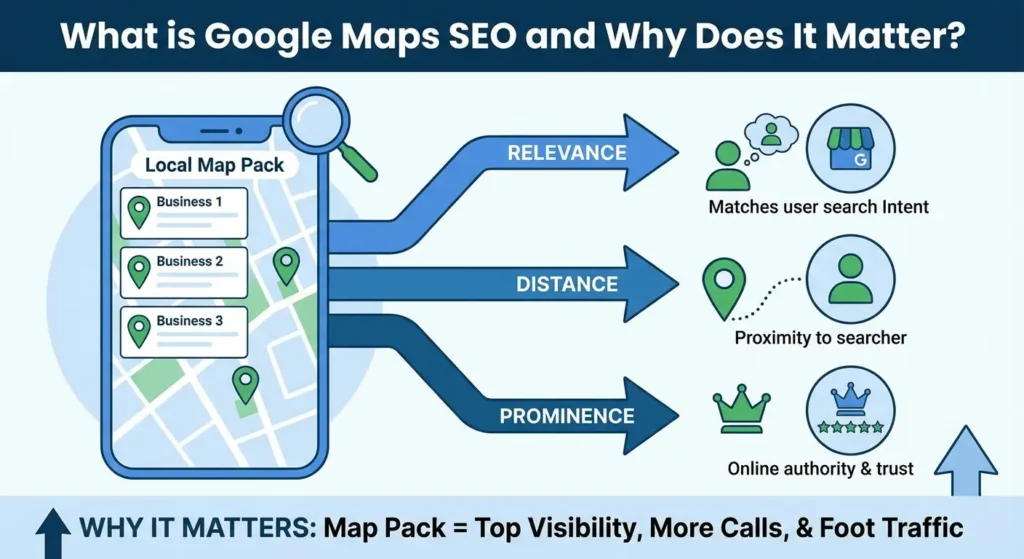
Google Maps SEO is the process of updating your online presence to appear higher in the local map results.
Search engines use different rules for local searches compared to regular website searches. For local search, the algorithm looks at three main things: relevance, distance, and prominence.
Relevance means how well your business matches what the person is searching for. Distance refers to how close your business is to the person searching. Prominence is about how well-known and trusted your business is online.
Focusing on these three areas is important because the map pack appears above standard website links for local searches.
Even if a business has the best website in the city, they will miss out on the majority of search traffic if their map profile is not optimized. People trust the map results because they show immediate information like star ratings, opening hours, and exact locations.
Step 1: The Foundation
You cannot rank a profile that does not exist or has not been verified. The absolute first step is to claim ownership of the business location on Google.
If you have not done this yet, you need to read our complete guide on how to create a Google Business Profile. That article covers the exact verification steps required by Google. You must have full administrative access to the listing before you can make any of the changes listed in this guide.
Sometimes, business owners find that there are duplicate listings for their address, or an old listing from a previous business is causing confusion in the search results.
If you run into this problem, you need to clear the bad data. You can learn the steps to fix this in our guide on how to delete a Google Business Profile. Having a clean slate is required before moving on to optimization.
Step 2: Core GBP Optimizations to Improve Google Ranking
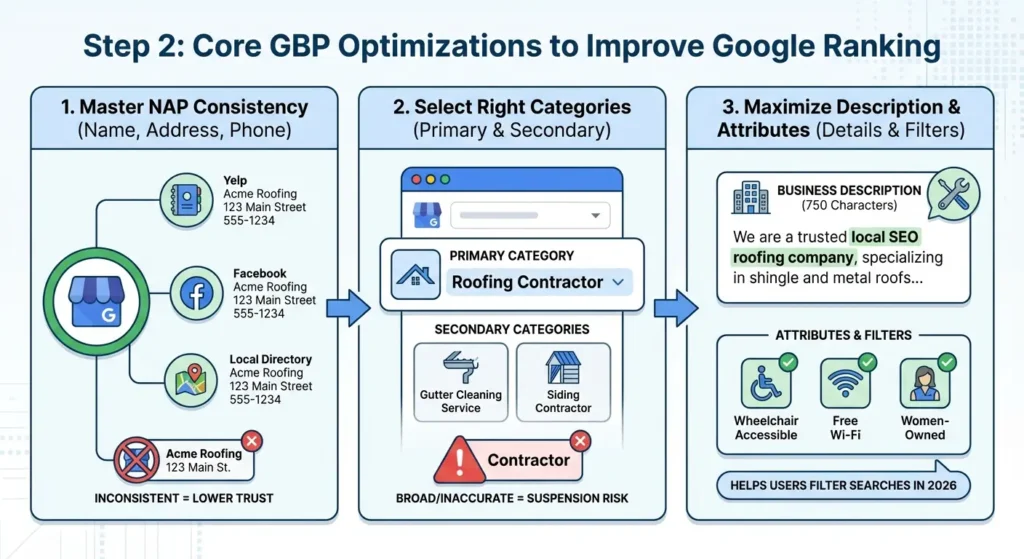
Once you have control of a single, verified listing, you can start updating the information.
For a broader overview of managing your profile, you can review our general Google Business Profile optimization strategies. Below are the specific technical updates needed to push your map ranking higher.
Master NAP Consistency Across the Web
NAP stands for Name, Address, and Phone number. Search engines check other websites, directories, and social platforms to verify that your business information is accurate.
If your Google profile says “Main Street” but your Yelp profile says “Main St.”, this slight difference can lower your trust score with the search algorithm.
You need to audit your business listings across the internet. Make sure your business name, exact address, and phone number are completely identical everywhere they appear.
Look at local directories, industry-specific sites, and national data aggregators. Consistent data tells the search engine that your business is legitimate and operating at the stated location.
Select the Right Primary and Secondary Categories
The category you choose tells Google exactly what services you offer. The primary category holds the most weight for your ranking.
Many businesses make the mistake of choosing a broad primary category. Instead of choosing “Contractor,” you should choose “Roofing Contractor” if that is your main service.
You should also add secondary categories to cover other specific services you provide, like “Gutter Cleaning Service” or “Siding Contractor.”
You can look at the top-ranking competitors in your area to see what primary categories they use. Do not add categories for services you do not actually provide, as this violates Google’s representation guidelines and can lead to a profile suspension.
Maximize Your Business Description and Attributes
The business description is a 750-character space where you can explain your services and history. While the description itself is not a massive ranking factor, it helps users understand your business and includes natural LSI keywords like Local SEO or your specific service terms.
You should also fill out all available attributes. Attributes are the small badges on your profile that show specific details.
In 2026, users often filter searches by attributes like “wheelchair accessible,” “free Wi-Fi,” or “women-owned.” Selecting all accurate attributes helps your profile show up when users apply these specific filters to their map searches.
Step 3: Driving Engagement and Prominence
Search engines want to recommend active businesses that customers like. A profile with recent photos, updates, and reviews will rank higher than a profile that has been ignored for a year.
The Impact of High-Quality Photos
Photos help customers see what you do, but they also help search engines understand your business.
Search algorithms use image recognition technology to scan your photos. If you run a pizza shop, uploading clear photos of pizza, ovens, and your dining room confirms your business type to the search engine.
Looking For Google Reviews? Claim your Discount Below
 8,492 people used this service in the past 7 days

You should upload new photos on a regular schedule. Profiles with more than 100 photos get significantly more clicks and calls than average profiles. Make sure to include photos of the outside of your building, the inside, your team working, and your products.
Generating and Managing Customer Reviews
Reviews are the largest factor for prominence. The total number of reviews, the average star rating, and the words customers use in their reviews all impact your map ranking.
When a customer writes a review and includes words like “fast plumbing repair,” it helps your profile rank for that specific phrase.
Getting reviews from real customers takes time, and new businesses often struggle to gain that initial visibility.
To speed up this process and build immediate trust, you can buy Google reviews directly from us. Our reputation management service provides safe, high-quality reviews that increase your star rating and give your profile the activity signals needed to move up the map rankings quickly.
Once you have reviews, you must respond to every single one. Responding to reviews, both positive and negative, shows that you manage the business actively.
Social Signals and Brand Awareness
While your social media accounts do not directly link to your map profile, the overall popularity of your brand matters.
When people talk about your business online and search for your brand name, it increases your prominence. If you need help building this overall brand awareness, consider using a service for social media growth to get more people looking for your company name.
Step 4: On-Page Local SEO Strategies
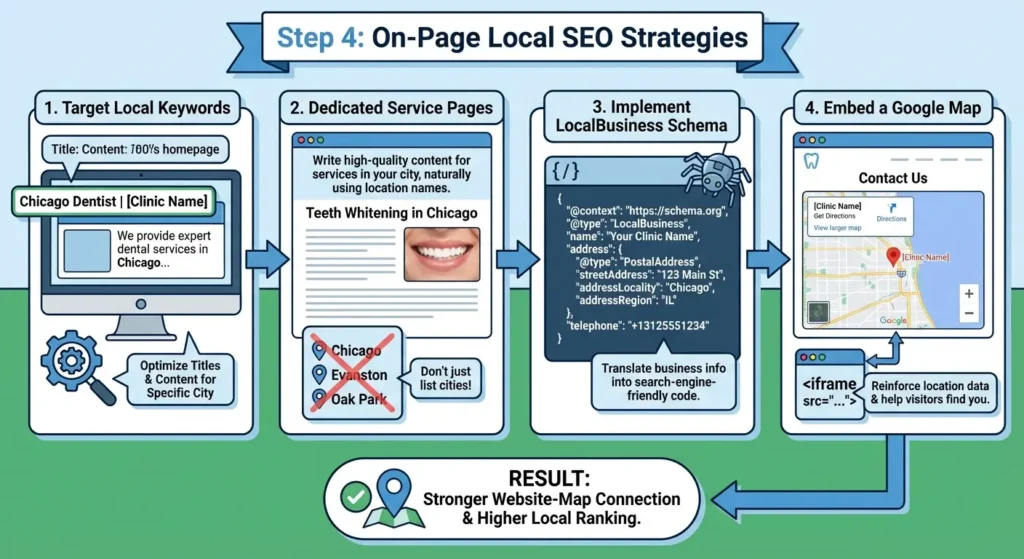
Your Google Map ranking is heavily tied to the website listed on your profile. The information on your website must validate the information on your map listing. The work here is strictly about on-page SEO and detailed content writing.
Target Local Keywords in Your Content Writing
Your website needs specific content written for the city or area you want to rank in. If you are a dentist in Chicago, your homepage title tag should read something like “Chicago Dentist | Your Clinic Name” instead of just “Home.”
You need to write dedicated service pages that include your location. Do not just list cities at the bottom of a page. Write high-quality paragraphs explaining the specific services you offer in that exact city. Use the city name in your main headings and naturally throughout the text.
The content needs to answer the user’s questions about your service in their area. Good content writing provides the context search engines need to connect your website to your map location.
Implement LocalBusiness Schema Markup
Schema markup is code you add to your website that translates your business information into a format search engines easily read. You can use the guidelines on Schema.org to generate this code.
You should add LocalBusiness structured data to your homepage and contact page. This code should include your exact business name, address, phone number, opening hours, and a link to your map profile.
This removes any guesswork for the search engine crawling your website. It provides a direct, technical link between your website files and your Google listing.
Embed a Google Map on Your Contact Page
Embedding your specific Google Map listing on your website’s contact page is a simple step that reinforces your location data.
Go to your business profile on Google Maps, click the share button, and choose the option to embed a map.
Copy the HTML code and paste it into the backend of your contact page. This provides a clear location signal to search engines and helps website visitors get directions to your office easily.
2026 Google Maps Ranking Checklist
Use this checklist to ensure you have completed the necessary steps for your map listing and website:
- Claim and verify your business location.
- Remove any duplicate listings or old business profiles at your address.
- Ensure your business name, address, and phone number are exact everywhere online.
- Set your most accurate primary category.
- Add relevant secondary categories.
- Fill out the 750-character business description.
- Select all applicable business attributes.
- Upload clear photos of your business regularly.
- Get consistent customer reviews.
- Respond to all reviews quickly.
- Update your website title tags and headings with your city name.
- Write detailed, location-specific service content on your website.
- Add LocalBusiness Schema markup to your website code.
- Embed your Google Map on your website contact page.
Frequently Asked Questions
What are the main ranking factors for Google Maps?
Google uses three main factors: relevance, distance, and prominence. Relevance is how well your business matches the search. Distance is how far your business is from the user.
Prominence is based on your online reputation, including your total reviews, review scores, and the local SEO optimizations on your linked website.
How long does it take to rank higher on Google Maps?
It depends on the competition in your area and the current state of your profile. If you operate in a small town with low competition, fixing your categories and getting a few reviews might improve your ranking in two to three weeks.
In a major city with high competition, it can take several months of consistent review generation, photo uploads, and website content writing to see significant movement.
Can a service-area business without a storefront rank on Google Maps?
Yes. Businesses like plumbers or landscapers can rank without showing a public address. You can set your profile to hide your physical street address and instead select the specific zip codes or cities you travel to for work.
To improve your ranking without a visible address, you must rely heavily on detailed local content writing on your website and generating high-quality customer reviews.
Do embedded Google Maps help SEO?
Yes, embedding the map helps confirm your location data to search engines. It creates a connection between the location listed on the profile and the content on your website.
It also provides a better experience for users trying to find your physical location, which is a positive signal for your overall website quality.